Introduction
Cross-Site Request Forgery (CSRF), sometimes pronounced “sea-surf” or referred to as XSRF, is a critical web security vulnerability that allows an attacker to induce a user’s browser to send an unintended, malicious request to a website where the user is already authenticated. Unlike phishing, where an attacker tries to trick a user into revealing credentials, CSRF exploits the browser’s inherent trust in a user’s session and the automatic inclusion of authentication credentials (like session cookies) with every request to a domain.
Understanding the internals of CSRF attacks is paramount for any web developer or security professional. It sheds light on fundamental browser security models, the critical role of cookies, and the design principles behind robust web application security. This guide will take you on a deep dive, explaining how these attacks work step by step, exploring the underlying browser mechanisms, dissecting common defenses and their bypasses, and providing a mental model for both attackers and defenders.
The Problem It Solves
Before the advent of robust CSRF defenses, a significant challenge existed in securing web applications against unauthorized state-changing actions. The core problem stemmed from the browser’s default behavior: when a user is logged into a website (e.g., a banking application), the browser stores session cookies for that domain. Crucially, any request originating from that browser, destined for the logged-in domain, will automatically include these session cookies, regardless of where the request was initiated (e.g., from a legitimate page or a malicious attacker-controlled page).
The challenge was that web applications, upon receiving a request with valid session cookies, would implicitly trust that the request was intentionally initiated by the legitimate, authenticated user. They had no inherent mechanism to distinguish between a request genuinely intended by the user and one stealthily forged by an attacker. This fundamental lack of origin verification for state-changing actions (like transferring money, changing passwords, or making purchases) created a gaping security hole, allowing attackers to manipulate user accounts without needing their credentials.
High-Level Architecture
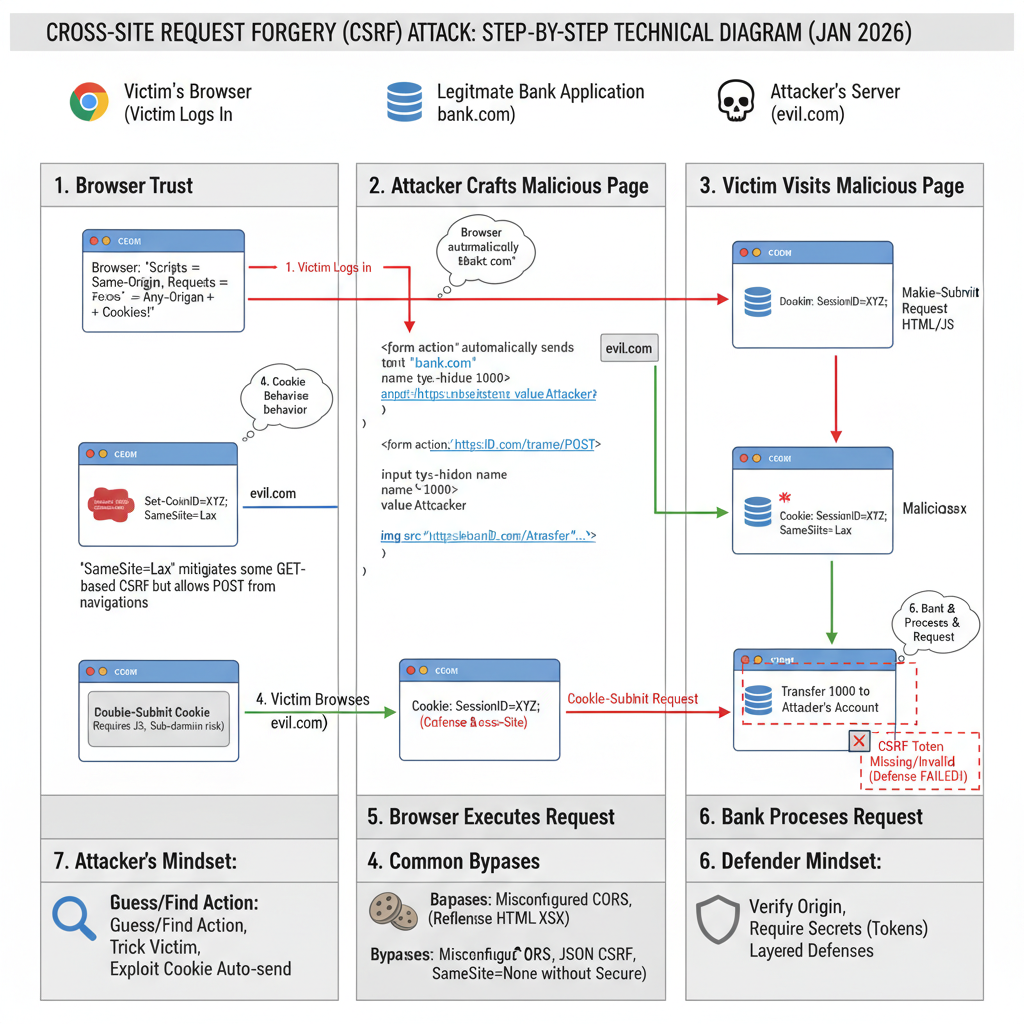
At a high level, a CSRF attack involves three main parties: the Attacker, the Victim’s Browser, and the Legitimate Web Application. The attacker leverages the victim’s active session and the browser’s automatic cookie handling to trick the legitimate application into performing an action.
Component Overview:
- Attacker Website: A server controlled by the attacker, hosting malicious HTML, JavaScript, or other content designed to trigger a forged request.
- Victim Browser: The web browser used by the victim, which is currently logged into the Legitimate Web Application. It holds the session cookies for the legitimate application.
- Legitimate Web Application (LWA): The target application (e.g., online banking, email service) where the victim has an active, authenticated session. It processes requests based on provided credentials (cookies).
- Database / Backend: The system storing user data and performing state-changing operations, affected by the forged request.
Data Flow:
- The attacker crafts a malicious request (e.g., a hidden form, an
<img>tag) targeting a state-changing action on the LWA. - The attacker lures the victim to their malicious website (e.g., via a phishing email, a malicious ad).
- When the victim’s browser loads the attacker’s page, the malicious content attempts to send a request to the LWA.
- Crucially, because the victim’s browser is already logged into the LWA, it automatically attaches the LWA’s session cookies to this request.
- The LWA receives the request with valid session cookies, interprets it as a legitimate request from the authenticated user, and processes the state change.
Key Concepts:
- Browser Trust Model: Browsers inherently trust that requests originating from the user’s browser, to a specific domain, are intended by the user, especially if valid session cookies are present.
- Same-Origin Policy (SOP): While SOP prevents a malicious script from reading responses from another origin, it generally does not prevent sending requests to another origin. This is a critical distinction that CSRF exploits.
- Cookie Behavior: Cookies are automatically sent by the browser to the domain they belong to, regardless of the originating page’s domain.
How It Works: Step-by-Step Breakdown
Let’s break down a classic CSRF attack step by step, considering the attacker’s and defender’s perspectives.
Step 1: Attacker Identifies Vulnerable Action and Crafts Malicious Request
Attacker’s Mental Model: “I need to find a state-changing action on the target website that doesn’t require any unique, unguessable parameters other than the session cookie. I’ll then craft an HTTP request that, when triggered from the victim’s browser, performs this action.”
The attacker first analyzes the target web application (e.g., bank.com) to find a sensitive action, such as transferring money or changing an email address. They observe the HTTP requests made for these actions.
Example Vulnerable Request (from bank.com):
POST /transfer HTTP/1.1
Host: bank.com
Cookie: sessionid=abcdef123456;
Content-Type: application/x-www-form-urlencoded
Content-Length: 29

recipient=attacker&amount=1000
The attacker notes that this POST request, with sessionid and parameters recipient and amount, is sufficient to perform a transfer. If the application also accepts GET requests for such actions (a common, but poor, practice), the attack becomes even simpler.
Example Vulnerable GET Request:
GET /transfer?recipient=attacker&amount=1000 HTTP/1.1
Host: bank.com
Cookie: sessionid=abcdef123456;
The attacker then creates a malicious webpage (attacker.com/malicious.html) that will trigger this request.
Code Example (Attacker’s Page - POST):
<!-- attacker.com/malicious.html -->
<html>
<body>
    <h1>You've Won a Prize! Click anywhere to claim!</h1>
    <form action="https://bank.com/transfer" method="POST" id="csrfForm">
        <input type="hidden" name="recipient" value="attacker">
        <input type="hidden" name="amount" value="1000">
    </form>
    <script>
        // Automatically submit the form
        document.getElementById('csrfForm').submit();
    </script>
    <p>Loading your prize...</p>
</body>
</html>
Code Example (Attacker’s Page - GET):
<!-- attacker.com/malicious.html -->
<html>
<body>
    <h1>Important Notice!</h1>
    <!-- An image tag can trigger a GET request without user interaction -->
    <img src="https://bank.com/transfer?recipient=attacker&amount=1000" style="display:none">
    <p>Please wait while we verify your account...</p>
</body>
</html>
Step 2: Attacker Lures Victim to Malicious Page
Attacker’s Mental Model: “I need to get a user who is currently logged into bank.com to visit my malicious page without realizing what’s happening.”
The attacker uses social engineering techniques (phishing email, malicious advertisement, compromised legitimate site) to trick the victim into visiting attacker.com/malicious.html.
Step 3: Victim’s Browser Executes Malicious Request
Victim Browser’s Internal Logic: “A page from attacker.com is requesting a resource from bank.com. I have cookies for bank.com. According to my rules, I must send these cookies along with the request.”
When the victim’s browser loads attacker.com/malicious.html:
- For the POST example, the JavaScript automatically submits the hidden form targeting
https://bank.com/transfer. - For the GET example, the browser attempts to load the
<img>tag’ssrcattribute, making a GET request tohttps://bank.com/transfer.
Crucially, in both cases, because the target domain (bank.com) matches the domain for which the browser holds session cookies, the browser automatically attaches those cookies to the outgoing request.
Example Request from Victim’s Browser (forged):
POST /transfer HTTP/1.1
Host: bank.com
Cookie: sessionid=abcdef123456;  <-- AUTOMATICALLY INCLUDED
Content-Type: application/x-www-form-urlencoded
Content-Length: 29
Origin: https://attacker.com  <-- This header might be present, but often ignored by older apps

recipient=attacker&amount=1000
Step 4: Legitimate Web Application Processes Forged Request
Legitimate Web Application’s Internal Logic: “I received a request to /transfer with a valid sessionid cookie. This user (abcdef123456) is authenticated. The request parameters indicate a transfer of 1000 to ‘attacker’. I should proceed with this action.”
The bank.com server receives the request. It sees a valid sessionid cookie (abcdef123456), which belongs to the victim. Without any additional validation, the application assumes the request is legitimate and intended by the authenticated user. It then executes the transfer, deducting 1000 units from the victim’s account and crediting it to the attacker.
Step 5: Attack Succeeds, Victim Unaware
The transfer is completed. The victim remains unaware that an unauthorized action has occurred, as the malicious page might simply display a benign loading message or redirect them, while the critical action happened in the background.
Deep Dive: Internal Mechanisms
To fully grasp CSRF, we need to understand the underlying browser and application mechanisms that attackers exploit and defenders try to secure.
Mechanism 1: Browser Trust Models and Cookie Behavior
The fundamental enabler of CSRF is the browser’s implicit trust and its cookie handling.
- Implicit Trust: Browsers are designed to allow a webpage from one origin (e.g.,
attacker.com) to make requests to another origin (e.g.,bank.com). This is essential for features like embedding images, loading scripts from CDNs, or making API calls (thoughfetchandXMLHttpRequestare subject to Same-Origin Policy for reading responses, sending requests is generally permitted, especially for simple requests). - Automatic Cookie Inclusion: For any request sent to a domain, the browser automatically attaches all cookies associated with that domain. This behavior is crucial for maintaining user sessions across multiple requests within a legitimate website. The browser does not check the origin of the page that initiated the request before attaching cookies; it only checks the destination domain.
This combination means an attacker can embed a request to bank.com on attacker.com, and if the victim is logged into bank.com, their session cookie will be sent, authenticating the forged request.
Mechanism 2: The SameSite Cookie Attribute
The SameSite cookie attribute, introduced to mitigate CSRF, modifies the browser’s behavior regarding when cookies are sent with cross-site requests.
SameSite=Lax(Default since Chrome 80): Cookies are sent with cross-site requests only for top-level navigations (e.g., clicking a link that takes you to a new site) and HTTP GET requests. They are NOT sent for POST requests,<img>tags,<iframe>s, orXHR/fetchrequests initiated from a different site. This provides good protection against many CSRF attacks, especially those using POST forms or<img>tags.- Attacker’s Mental Model (with
Lax): “My hidden POST form won’t work becauseSameSite=Laxwill block the cookie. I need to find a GET-based CSRF or trick the user into a top-level navigation.”
- Attacker’s Mental Model (with
SameSite=Strict: Cookies are never sent with cross-site requests, even for top-level navigations. They are only sent if the request originates from the same site as the cookie. This offers the strongest protection but can be inconvenient for legitimate cross-site linking (e.g., if you click a link from an external site to your bank, you’d have to log in again).SameSite=None: Cookies are sent with all cross-site requests, but they must also be markedSecure(meaning they are only sent over HTTPS). This is necessary for legitimate cross-site use cases (e.g., third-party widgets, SSO). IfSecureis missing, the cookie will be rejected.- Attacker’s Mental Model (with
None): “If theSecureflag is missing withSameSite=None, I can exploit it. Otherwise,SameSite=None; Securemeans I still can’t read the cookie, but the browser will send it, so CSRF is possible if no other defenses are in place.”
- Attacker’s Mental Model (with
Why SameSite can fail:
- Legacy browsers: Older browsers might not support
SameSiteor interpret it differently. SameSite=NonewithoutSecure: If a developer incorrectly setsSameSite=Nonewithout theSecureflag, the cookie will be ignored by modern browsers, potentially leading to unintended behavior or an attacker trying to exploit this misconfiguration.- GET-based CSRF (with
Lax): If the vulnerable action is accessible via a GET request,SameSite=Laxwill still send the cookie if the attacker can trick the user into a top-level navigation (e.g., a simple link click). - Bypasses (as per search context): If defenses are only applied to specific request methods, an attacker might bypass by changing the method (e.g., from an expected POST to a GET if the server accepts it).
Mechanism 3: CSRF Tokens (Synchronizer Token Pattern)
The most robust and widely used defense against CSRF is the Synchronizer Token Pattern, which uses CSRF tokens.
How it works:
- When a user requests a page containing a state-changing form (e.g., a transfer form), the server generates a unique, unguessable, and cryptographically secure random token.
- This token is stored server-side (e.g., in the user’s session) and also embedded within the form as a hidden input field.
- When the user submits the form, the browser sends the form data, including the CSRF token, along with the session cookie.
- The server receives the request, retrieves the token from the request, and compares it with the token stored in the user’s session.
- If the tokens match, the request is considered legitimate and processed. If they don’t match, the request is rejected as a potential CSRF attack.
Example Request with CSRF Token:
<!-- bank.com/transfer.html -->
<form action="/transfer" method="POST">
    <input type="hidden" name="recipient" value="attacker">
    <input type="hidden" name="amount" value="1000">
    <input type="hidden" name="csrf_token" value="R4nd0mStR1nGv4Lu3"> <-- CSRF Token
    <button type="submit">Transfer</button>
</form>
Attacker’s Mental Model (with CSRF Token): “I can still submit a form, but I don’t know the csrf_token. Since Same-Origin Policy prevents me from reading the legitimate page’s HTML to extract the token, my forged request will lack this valid token, and the server will reject it.”
Why CSRF tokens can fail:
- Missing Token: If the developer forgets to include the token for a sensitive action.
- Token Validation Bypass:
- Removing the token: Some applications might validate the token if present but proceed if it’s entirely absent. An attacker could remove the
csrf_tokenparameter from their forged request. - Reflected XSS: If the application has a Cross-Site Scripting (XSS) vulnerability, an attacker can inject malicious script that reads the legitimate page, extracts the CSRF token, and then uses it in a forged request. XSS effectively bypasses CSRF protection because the attacker’s script is executing within the legitimate origin.
- Token fixed/predictable: If the token is not truly random or tied to the session.
- GET requests: If the application accepts GET requests for state-changing actions, tokens might be mistakenly omitted from query parameters, making them vulnerable.
- Broken
Originheader validation: If the server checks theOriginheader but has a weak whitelist, an attacker might bypass it.
- Removing the token: Some applications might validate the token if present but proceed if it’s entirely absent. An attacker could remove the
Mechanism 4: Double-Submit Cookie Pattern
This is an alternative to the Synchronizer Token Pattern, often used in stateless APIs or when server-side session state is undesirable for token storage.
How it works:
- When a user visits the site, the server generates a random token and sets it as a cookie (e.g.,
csrf_cookie=R4nd0mStR1nGv4Lu3) withSameSite=LaxorStrict. - For subsequent requests, JavaScript reads this cookie’s value and includes it as a hidden form field or a custom HTTP header (e.g.,
X-CSRF-Token). - The server receives the request, compares the value in the cookie with the value in the form field/header. If they match, the request is legitimate.
Attacker’s Mental Model (with Double-Submit): “I can’t read the csrf_cookie due to SOP, so I can’t include a valid token in my forged request’s form field or header. Even if I send my own csrf_cookie, the server will compare it to the one I sent in the form, and they won’t match the original cookie that the browser automatically sent for the legitimate domain.”
The key here is that the attacker’s domain cannot read cookies set by bank.com, nor can it set cookies for bank.com. So, while the browser will automatically send the legitimate csrf_cookie (if SameSite allows), the attacker has no way to include a matching token in the request body or header.
Why Double-Submit can fail:
- Subdomain vulnerabilities: If an attacker can perform XSS on a subdomain, they can potentially read and set cookies for the main domain, bypassing the defense.
- Cookie
SameSite=NonewithoutSecure: As discussed, this can weaken cookie security.
Hands-On Example: Building a Mini Version
Let’s illustrate the core concept of a CSRF attack and a basic token defense with simplified server-side logic and HTML.
Scenario: A bank application allows users to change their email address.
1. Vulnerable Server-Side Logic (Simplified Python Flask):
# app_vulnerable.py
from flask import Flask, request, session, redirect, url_for, render_template_string

app = Flask(__name__)
app.secret_key = 'supersecretkey' # Insecure for real apps, used for session management

USERS = {'user': 'password'} # Dummy user database
USER_EMAILS = {'user': '[email protected]'}

# Mock login
@app.route('/login', methods=['GET', 'POST'])
def login():
    if request.method == 'POST':
        username = request.form['username']
        password = request.form['password']
        if USERS.get(username) == password:
            session['username'] = username
            return redirect(url_for('profile'))
        return 'Invalid credentials'
    return '''
        <h1>Login</h1>
        <form method="post">
            Username: <input type="text" name="username"><br>
            Password: <input type="password" name="password"><br>
            <input type="submit" value="Login">
        </form>
    '''

# User profile page
@app.route('/profile')
def profile():
    if 'username' not in session:
        return redirect(url_for('login'))
    username = session['username']
    current_email = USER_EMAILS.get(username, 'N/A')
    return render_template_string('''
        <h1>Welcome, {{ username }}!</h1>
        <p>Your current email: {{ current_email }}</p>
        <h2>Change Email (Vulnerable)</h2>
        <form action="/change-email-vulnerable" method="POST">
            New Email: <input type="email" name="new_email" value="{{ current_email }}"><br>
            <input type="submit" value="Update Email">
        </form>
        <p><a href="/logout">Logout</a></p>
    ''', username=username, current_email=current_email)

# Vulnerable email change endpoint
@app.route('/change-email-vulnerable', methods=['POST'])
def change_email_vulnerable():
    if 'username' not in session:
        return redirect(url_for('login'))
    username = session['username']
    new_email = request.form.get('new_email')
    if new_email:
        USER_EMAILS[username] = new_email
        return f'Email for {username} updated to {new_email}!'
    return 'Invalid email provided.'

@app.route('/logout')
def logout():
    session.pop('username', None)
    return 'Logged out.'

if __name__ == '__main__':
    app.run(port=5000, debug=True)
To run this: Save as app_vulnerable.py, install Flask (pip install Flask), then python app_vulnerable.py. Navigate to http://127.0.0.1:5000/login.
2. Attacker’s Malicious Page (attacker.html):
<!-- attacker.html -->
<html>
<head>
    <title>Free Gift Card!</title>
</head>
<body>
    <h1>Congratulations, you've won a $1000 Gift Card!</h1>
    <p>To claim your prize, please ensure your email is up-to-date.</p>

    <!-- Hidden form to trigger CSRF -->
    <form action="http://127.0.0.1:5000/change-email-vulnerable" method="POST" id="csrfForm">
        <input type="hidden" name="new_email" value="[email protected]">
    </form>

    <script>
        // Automatically submit the form
        document.getElementById('csrfForm').submit();
        console.log("CSRF attack initiated!");
    </script>
    <p>Processing your prize claim...</p>
</body>
</html>
How to demonstrate the attack:
- Start
app_vulnerable.py. - Open your browser and go to
http://127.0.0.1:5000/login. Log in withusername: user,password: password. - Verify your email is
[email protected]on the profile page. - Open a new tab (in the same browser) and navigate to the local
attacker.htmlfile (e.g.,file:///path/to/attacker.html). - Observe the attacker’s page.
- Go back to the
bank.comtab (http://127.0.0.1:5000/profile) and refresh. You will see the email has changed to[email protected]. The CSRF attack succeeded because the browser automatically sent thesessionidcookie frombank.comwhen the attacker’s page submitted the form.
Real-World Project Example
Let’s enhance the previous example with a proper CSRF defense using the Synchronizer Token Pattern.
1. Secure Server-Side Logic (app_secure.py):
# app_secure.py
from flask import Flask, request, session, redirect, url_for, render_template_string, flash
import os
import secrets # For generating secure tokens

app = Flask(__name__)
app.secret_key = os.urandom(24) # More secure than a hardcoded string

USERS = {'user': 'password'}
USER_EMAILS = {'user': '[email protected]'}

# Mock login
@app.route('/login', methods=['GET', 'POST'])
def login():
    if request.method == 'POST':
        username = request.form['username']
        password = request.form['password']
        if USERS.get(username) == password:
            session['username'] = username
            # Generate CSRF token on successful login or page load
            session['csrf_token'] = secrets.token_hex(16)
            return redirect(url_for('profile'))
        flash('Invalid credentials')
    return '''
        <h1>Login</h1>
        <form method="post">
            Username: <input type="text" name="username"><br>
            Password: <input type="password" name="password"><br>
            <input type="submit" value="Login">
        </form>
    '''

# User profile page with CSRF token
@app.route('/profile')
def profile():
    if 'username' not in session:
        return redirect(url_for('login'))
    username = session['username']
    current_email = USER_EMAILS.get(username, 'N/A')

    # Ensure a CSRF token exists for the session
    if 'csrf_token' not in session:
        session['csrf_token'] = secrets.token_hex(16)

    return render_template_string('''
        <h1>Welcome, {{ username }}!</h1>
        <p>Your current email: {{ current_email }}</p>
        <h2>Change Email (Secure)</h2>
        <form action="/change-email-secure" method="POST">
            New Email: <input type="email" name="new_email" value="{{ current_email }}"><br>
            <input type="hidden" name="csrf_token" value="{{ csrf_token }}"> <-- CSRF Token
            <input type="submit" value="Update Email">
        </form>
        <p><a href="/logout">Logout</a></p>
        {% with messages = get_flashed_messages() %}
            {% if messages %}
                <ul class=flashes>
                {% for message in messages %}
                    <li>{{ message }}</li>
                {% endfor %}
                </ul>
            {% endif %}
        {% endwith %}
    ''', username=username, current_email=current_email, csrf_token=session['csrf_token'])

# Secure email change endpoint
@app.route('/change-email-secure', methods=['POST'])
def change_email_secure():
    if 'username' not in session:
        return redirect(url_for('login'))

    # CSRF Token validation
    request_token = request.form.get('csrf_token')
    session_token = session.get('csrf_token')

    if not request_token or not session_token or request_token != session_token:
        flash('CSRF token mismatch or missing. Request blocked.')
        return redirect(url_for('profile')) # Redirect back to profile on failure

    username = session['username']
    new_email = request.form.get('new_email')
    if new_email:
        USER_EMAILS[username] = new_email
        flash(f'Email for {username} updated to {new_email}!')
        return redirect(url_for('profile'))
    flash('Invalid email provided.')
    return redirect(url_for('profile'))

@app.route('/logout')
def logout():
    session.pop('username', None)
    session.pop('csrf_token', None) # Clear token on logout
    flash('Logged out.')
    return redirect(url_for('login'))

if __name__ == '__main__':
    app.run(port=5001, debug=True)
To run this: Save as app_secure.py, install Flask, then python app_secure.py. Navigate to http://127.0.0.1:5001/login.
2. Attacker’s Malicious Page (attacker_attempt.html):
<!-- attacker_attempt.html -->
<html>
<head>
    <title>Another Free Gift Card!</title>
</head>
<body>
    <h1>Congratulations again! Another $1000 Gift Card!</h1>
    <p>To claim this second prize, we need to re-verify your email.</p>

    <!-- Hidden form to trigger CSRF - Attacker does NOT know the CSRF token -->
    <form action="http://127.0.0.1:5001/change-email-secure" method="POST" id="csrfForm">
        <input type="hidden" name="new_email" value="[email protected]">
        <!-- Attacker cannot guess or read the legitimate csrf_token -->
        <input type="hidden" name="csrf_token" value="B4dGu3sS3dTok3n">
        <!-- Or even worse, the attacker might omit it entirely:
             <input type="hidden" name="csrf_token" value=""> -->
    </form>

    <script>
        document.getElementById('csrfForm').submit();
        console.log("CSRF attack attempt initiated!");
    </script>
    <p>Processing your second prize claim...</p>
</body>
</html>
How to observe defense:
- Start
app_secure.py. - Open your browser and go to
http://127.0.0.1:5001/login. Log in withusername: user,password: password. - Verify your email is
[email protected]on the profile page. Note thecsrf_tokenvalue in the hidden input field in the source code. - Open a new tab (in the same browser) and navigate to the local
attacker_attempt.htmlfile. - Observe the attacker’s page.
- Go back to the
bank.comtab (http://127.0.0.1:5001/profile) and refresh. You will see that the email has NOT changed, and a flash message “CSRF token mismatch or missing. Request blocked.” is displayed. The CSRF attack was prevented because the attacker’s forged request did not contain the correct, session-specific CSRF token.
Performance & Optimization
CSRF defenses generally have a minimal performance impact.
- CSRF Tokens:
- Overhead: Generating a random token per request/session and storing it server-side (e.g., in a session store, Redis) adds a small computational cost and memory footprint. For every state-changing request, there’s an additional lookup and comparison.
- Optimization: Tokens can be generated once per session or per form, rather than per request, reducing generation overhead. Using cryptographically secure pseudorandom number generators is essential for security, even if slightly slower than insecure ones.
SameSiteCookies:- Overhead: Negligible. It’s a browser-level instruction that dictates cookie sending behavior. No server-side computation is added.
- Double-Submit Cookies:
- Overhead: Similar to CSRF tokens, but potentially less server-side storage if the token is only stored in the cookie and compared against itself (client-side cookie vs. value in request body). This is often favored for stateless APIs.
The security benefits overwhelmingly outweigh the minor performance costs of implementing these defenses. The primary “optimization” is to ensure these defenses are implemented correctly and universally across all sensitive actions.
Common Misconceptions
- “GET requests are safe from CSRF.”
- Clarification: This is false. While POST requests are more common for state changes, GET requests can absolutely be used for CSRF if the application processes state changes based on URL parameters. The
SameSite=Laxcookie attribute offers some protection for GET requests unless they are top-level navigations (e.g., a direct link click), butStrictis safer. Best practice: Never use GET requests for state-changing operations.
- Clarification: This is false. While POST requests are more common for state changes, GET requests can absolutely be used for CSRF if the application processes state changes based on URL parameters. The
- “I’m safe because I use HTTPS.”
- Clarification: HTTPS protects against eavesdropping and tampering of requests in transit. It does not prevent an attacker from tricking a browser into sending a request to your secure site using the victim’s valid session cookies. HTTPS is essential, but it’s not a CSRF defense on its own.
- “The Same-Origin Policy (SOP) prevents CSRF.”
- Clarification: SOP prevents an attacker’s script from reading the response from another origin. It does not prevent an attacker’s page from sending requests to another origin, especially simple GET/POST requests and embedding resources. CSRF exploits this distinction.
- “Referer header validation is enough.”
- Clarification: The
Referer(orReferrer) header indicates the origin of the request. While checking if it matches your domain can help, it’s unreliable. Browsers might omit theRefererheader (e.g., for privacy reasons, or if navigating from HTTPS to HTTP), and it can sometimes be spoofed (though less common in modern browsers for cross-origin requests). It’s a weak defense and should not be relied upon solely.
- Clarification: The
- “My firewall/WAF protects against CSRF.”
- Clarification: While a Web Application Firewall (WAF) might have some generic rules, a WAF typically cannot distinguish between a legitimate user-initiated request and a forged one that includes valid session cookies. It doesn’t have the context of the user’s session token. Specific WAF rules can be configured for CSRF, but it’s often better to implement protection at the application layer.
Advanced Topics
CSRF Token Bypasses and Why Defenses Fail
XSS (Cross-Site Scripting) to CSRF: This is the most potent bypass. If an application is vulnerable to XSS, an attacker can inject JavaScript that runs in the context of the legitimate domain. This script can then:
- Read the CSRF token from the DOM of the legitimate page.
- Construct a forged request including the valid CSRF token.
- Send the request, effectively bypassing the token defense entirely. This highlights why XSS is often considered a “master vulnerability” that can neutralize many other defenses.
Changing Request Methods (GET to POST, POST to GET):
- As mentioned in the search context, some applications might only apply CSRF defenses to POST requests but leave GET requests vulnerable (or vice-versa). An attacker might find that
/change-passwordexpects POST with a token, but/change-password?new_pass=foo(GET) processes the request without a token. - Defense failure: Inconsistent application of CSRF protection across all HTTP methods for sensitive actions.
- As mentioned in the search context, some applications might only apply CSRF defenses to POST requests but leave GET requests vulnerable (or vice-versa). An attacker might find that
Removing the Token Parameter Entirely:
- Some server-side logic might be written to validate the CSRF token if it’s present, but proceed without validation if the parameter is entirely missing from the request.
- Defense failure: Incomplete validation logic that doesn’t strictly require the token to be present. The server should always expect and validate the token for protected actions.
Relaxed
SameSitePolicies for Session Cookies:- If a session cookie is explicitly set with
SameSite=None; Secure, it allows cross-site requests to carry the cookie. If the application relies only onSameSitefor CSRF protection and no other token-based defense, it becomes vulnerable when this policy is necessary for legitimate cross-site functionality. - Defense failure: Over-reliance on
SameSite=Nonewithout a robust token-based defense.
- If a session cookie is explicitly set with
Broken
OriginorRefererHeader Validation:- Some applications attempt to validate the
OriginorRefererheader to ensure the request comes from their own domain. However, if the whitelist is poorly configured (e.g.,*.example.comallowingattacker.example.com) or if the validation logic is flawed, attackers can bypass it. - Defense failure: Weak or easily circumvented origin/referer checks.
- Some applications attempt to validate the
Other Advanced Defenses
- Custom Headers (e.g.,
X-CSRF-Token): For AJAX-based applications, embedding the CSRF token in a custom HTTP header is common. Browsers often restrict custom headers from being sent cross-origin, adding another layer of defense (though this is not a primary CSRF defense, but a side effect of SOP’s restrictions on “non-simple” requests). - User Re-authentication: For extremely sensitive actions (e.g., changing primary email, high-value transfers), requiring the user to re-enter their password before proceeding offers the strongest protection, as this cannot be forged by CSRF.
Comparison with Alternatives
CSRF is a specific type of attack against web applications. It’s often compared or confused with other vulnerabilities:
CSRF vs. XSS (Cross-Site Scripting):
- CSRF: Tricks the browser into sending an unintended request to a legitimate site. Exploits browser trust in cookies. Cannot read responses.
- XSS: Tricks the browser into executing malicious script from a legitimate site. Exploits browser trust in legitimate content. Can read/modify DOM, steal cookies, bypass CSRF tokens.
- Relationship: XSS can often be used to bypass CSRF defenses. XSS is generally considered more severe.
CSRF vs. Clickjacking:
- CSRF: Forges a request that the user doesn’t intend to send.
- Clickjacking: Tricks the user into clicking an invisible UI element on a legitimate site by overlaying it with malicious content. The user intends to click something, but not what actually happens.
- Relationship: Both involve tricking the user, but at different layers. Clickjacking is more about UI manipulation, while CSRF is about request forgery.
CSRF vs. Server-Side Request Forgery (SSRF):
- CSRF: Attack originates from the client-side (victim’s browser) to the target application.
- SSRF: Attack originates from the server-side of the vulnerable application, forcing it to make requests to internal or external systems.
- Relationship: Both involve “forgery” but from different points in the architecture.
Debugging & Inspection Tools
To understand and debug CSRF, as well as test for its presence:
- Browser Developer Tools (F12):
- Network Tab: Observe all HTTP requests, including headers (like
Cookie,Origin,Referer) and request bodies. This is crucial for seeing if cookies are sent and if CSRF tokens are present/correct. - Application Tab (Cookies): Inspect cookies set for specific domains, including their
SameSiteattribute.
- Network Tab: Observe all HTTP requests, including headers (like
- Burp Suite / OWASP ZAP:
- Proxy: Intercept and modify HTTP requests and responses. This allows you to manually remove CSRF tokens, change request methods, or alter parameters to test for vulnerabilities.
- Repeater: Send modified requests multiple times to test different attack vectors.
- Intruder: Automate sending many requests with varying parameters to find bypasses.
- Postman/Insomnia: Useful for crafting specific requests and observing responses, though less suited for simulating full browser behavior with cookies.
- Manual Code Review: Inspect server-side code for:
- Presence and validation of CSRF tokens on all state-changing endpoints.
- Correct
SameSiteattribute for session cookies. - Handling of different HTTP methods (GET/POST) for sensitive actions.
- Lack of XSS vulnerabilities, which can bypass CSRF.
Key Takeaways
- CSRF exploits the browser’s automatic inclusion of session cookies with requests, regardless of the request’s origin.
- The legitimate web application trusts these cookies and processes the forged request as if it were initiated by the authenticated user.
- CSRF Tokens (Synchronizer Token Pattern) are the most robust defense, requiring a unique, unguessable token in both the user’s session and the submitted form/request.
- The
SameSitecookie attribute provides significant browser-level protection, especiallyLax(default) andStrict, by restricting when cookies are sent cross-site. However, it’s not a complete defense, especially against GET-based CSRF withLaxor whenNoneis used. - Common bypasses include XSS (which can steal tokens), inconsistent token validation, removing the token parameter, and misconfigured
SameSitepolicies. - Never use GET requests for state-changing actions.
- Implement CSRF protection universally across all sensitive actions, using a combination of
SameSitecookies and CSRF tokens. - CSRF is distinct from XSS and Clickjacking, though XSS can often be used to bypass CSRF.
References
- OWASP Cross-Site Request Forgery (CSRF) Prevention Cheat Sheet
- MDN Web Docs - SameSite cookies
- PortSwigger - Cross-Site Request Forgery (CSRF)
- Snyk - CSRF Attack | Tutorial & Examples
Transparency Note
This document was created by an AI expert based on the provided search context and general knowledge of web security as of early 2026. While efforts were made to ensure accuracy and depth, web security is a constantly evolving field. Always refer to official documentation and current best practices for the most up-to-date information.