Introduction
In the intricate landscape of web security, protecting users from malicious attacks is a paramount concern. Content Security Policy (CSP) stands as a critical defense mechanism, acting as an additional layer of security to mitigate various code injection threats. It’s not merely a “firewall” but a sophisticated agreement between a web server and a browser, dictating precisely which resources the browser is permitted to load and execute for a given page.
Understanding CSP’s internals is crucial for developers, security engineers, and architects alike. A poorly configured CSP can be easily bypassed, offering a false sense of security, while a well-crafted policy can significantly enhance a web application’s resilience against prevalent attacks like Cross-Site Scripting (XSS) and clickjacking. This guide will take you on a deep dive into the fundamental workings of CSP, exploring its architecture, enforcement mechanisms, common pitfalls, advanced techniques, and how it actively prevents real-world attacks.
The Problem It Solves
Before CSP, web applications faced a significant and pervasive threat: Cross-Site Scripting (XSS). XSS attacks occur when an attacker injects malicious client-side scripts (typically JavaScript) into a web page viewed by other users. These scripts can then bypass the Same-Origin Policy, steal cookies, session tokens, deface websites, redirect users, or perform actions on behalf of the victim.
Consider a typical XSS scenario: a vulnerable comment section on a website allows users to post unescaped HTML. An attacker posts a comment like <script>alert(document.cookie)</script>. When another user views this comment, their browser executes the injected script, revealing their session cookie to the attacker. While input validation and output encoding are primary defenses, they are often complex to implement perfectly across an entire application, leading to vulnerabilities.
The core problem CSP addresses is that once malicious code is injected into a page, the browser, by default, trusts and executes it. There was no native mechanism for a server to tell a browser, “Only execute scripts from my domain, and only load images from these specific CDNs.” This lack of explicit resource control left browsers vulnerable to executing any code present in the document, regardless of its origin or intent, once it reached the client. CSP aims to fill this gap by providing a declarative way to restrict the origins and types of content a browser can load and execute.
High-Level Architecture
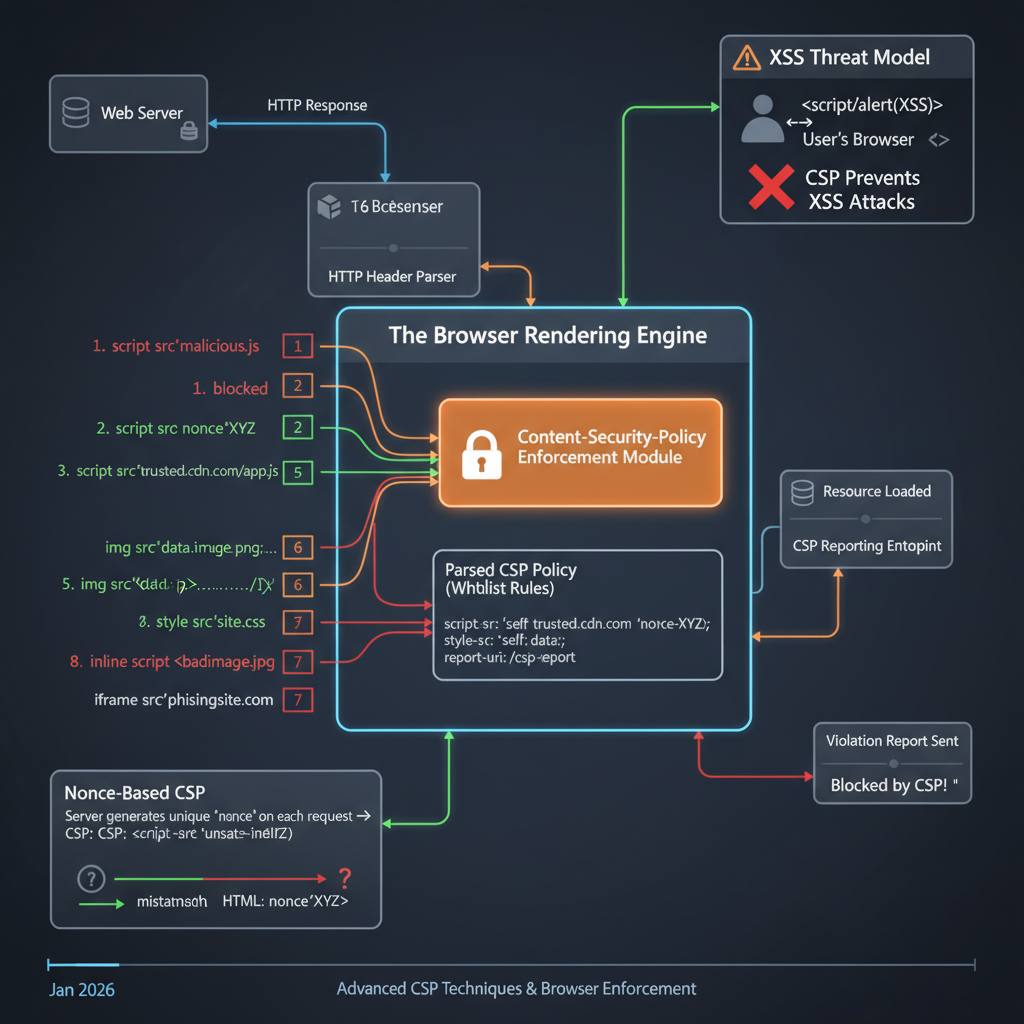
At its core, CSP establishes a trust relationship between a web server and a client browser. The server defines a policy, and the browser enforces it.
Component Overview:
- Web Server: Responsible for generating HTTP responses, including the
Content-Security-Policyheader (or embedding it via a<meta>tag). - Client Browser: The user agent that receives, parses, and enforces the CSP.
- Policy Store: An internal browser component that holds the active CSP directives for the current page.
- Resource Request Interceptor: A browser mechanism that intercepts every resource load (scripts, stylesheets, images, fonts, frames, etc.) before they are fetched or executed.
- Resource Type & Source Check: The core enforcement logic. It compares the requested resource’s type and origin against the rules defined in the Policy Store.
- Report-URI Endpoint: An optional URL on the web server (or a third-party service) where the browser sends JSON reports about CSP violations.
- Block Resource Load: If a resource violates the policy, the browser prevents it from loading or executing.
- Load Resource: If a resource conforms to the policy, the browser proceeds with its normal loading process.
Data Flow:
- The Web Server sends an HTTP response for a requested page, including a
Content-Security-Policyheader. - The Client Browser receives the response. Before rendering the page, it parses the CSP header and stores its directives.
- As the browser begins parsing the HTML and encountering resource requests (e.g.,
<script src="...">,<img src="...">, inline<style>,eval()), the Resource Request Interceptor steps in. - For each resource, the Resource Type & Source Check consults the Policy Store to determine if the resource is allowed based on its type and source.
- If a violation occurs:
- The browser blocks the resource load (e.g., the script won’t execute, the image won’t display).
- If a
report-uridirective is present, the browser sends a JSON-formatted violation report to the specified Report-URI Endpoint on the server.
- If the resource is allowed, the browser loads the resource as normal.
How It Works: Step-by-Step Breakdown
CSP works by defining a whitelist of trusted content sources. The browser then strictly adheres to this whitelist, blocking anything that deviates.
Step 1: Policy Definition
The journey begins with the web application defining its security policy. This is primarily done via an HTTP response header, but can also be embedded directly into HTML using a <meta> tag.
HTTP Header (Recommended): The server adds a
Content-Security-Policyheader to its HTTP responses. This is the most robust method as it applies to the entire document before any content is parsed.HTTP/1.1 200 OK Content-Type: text/html Content-Security-Policy: default-src 'self'; script-src 'self' https://cdn.example.com; style-src 'self' 'unsafe-inline'; report-uri /csp-report-endpointThis example policy states:
default-src 'self': By default, all resources (if not specified by a more specific directive) can only be loaded from the same origin as the document itself.script-src 'self' https://cdn.example.com: Scripts can be loaded from the same origin or fromhttps://cdn.example.com.style-src 'self' 'unsafe-inline': Styles can be loaded from the same origin, and inline styles (e.g.,<style>tags orstyleattributes) are also permitted.report-uri /csp-report-endpoint: Send violation reports to this relative URL.
HTML Meta Tag: Less preferred due to potential for bypasses (e.g., if an attacker can inject a meta tag before the legitimate one).
<!DOCTYPE html>
<html>
<head>
    <meta http-equiv="Content-Security-Policy" content="default-src 'self'; script-src 'self'">
    <!-- ... rest of head ... -->
</head>
<body>...</body>
</html>
Step 2: Browser Policy Parsing
Upon receiving the HTTP response, the browser’s rendering engine immediately parses the Content-Security-Policy header (or meta tag). It extracts all the directives (e.g., default-src, script-src, style-src) and their associated values (e.g., 'self', https://cdn.example.com, 'unsafe-inline'). This parsed policy is then stored internally, effectively becoming a set of rules for the current page.
Step 3: Resource Request Interception
As the browser starts to parse the HTML document and construct the Document Object Model (DOM), it encounters various elements that require fetching or executing external resources, or even inline content. This includes:
<script src="...">or<script>...</script><link rel="stylesheet" href="...">or<style>...</style><img src="..."><iframe src="...">fetch()andXMLHttpRequestcallseval()andsetTimeout(string, ...)- WebAssembly modules
- Fonts, media files, etc.
Crucially, the browser’s CSP engine intercepts every single one of these requests before they are initiated or executed.
Step 4: Policy Enforcement
For each intercepted resource, the CSP engine performs a series of checks against the stored policy:
Directive Matching: It first determines which specific directive applies to the resource type. For instance, a
<script>tag will be checked againstscript-src, an<img>tag againstimg-src, and so on.Fallback to
default-src: If no specific directive exists for a particular resource type (e.g., nofont-srcis defined), the browser falls back to thedefault-srcdirective. Ifdefault-srcis also absent, it effectively defaults to allowing anything for that resource type, which is whydefault-src 'self'is a common and important starting point.Source Whitelisting: The engine then compares the resource’s origin (domain, protocol, port) and any specific keywords (like
'self','unsafe-inline','nonce-...','sha256-...') against the allowed sources specified in the matched directive.// Conceptual internal check for a script resource function checkScriptAgainstCSP(scriptSource, cspPolicy) { const scriptSrcDirective = cspPolicy['script-src'] || cspPolicy['default-src']; if (!scriptSrcDirective) { return true; // No policy, allow everything (bad security practice) } // Check if 'self' is allowed and source is same origin if (scriptSrcDirective.includes("'self'") && isSameOrigin(scriptSource, document.location.origin)) { return true; } // Check against explicit domains for (const allowedDomain of scriptSrcDirective.filter(s => s.startsWith('https://'))) { if (scriptSource.startsWith(allowedDomain)) { return true; } } // Check for nonces or hashes (more advanced, see Deep Dive) // ... return false; // Resource source not allowed }
Step 5: Blocking or Reporting
If the resource’s origin or characteristics (e.g., inline script without a nonce) do not match any of the allowed sources or conditions in the applicable directive, a CSP violation occurs.
- Blocking: The browser immediately blocks the resource. The script will not execute, the image will not display, the stylesheet will not apply, and the
eval()call will fail. This is the primary security benefit. - Reporting: If the policy includes a
report-uridirective, the browser constructs a JSON object containing details about the violation (e.g., blocked URI, violated directive, document URI, original policy) and sends it as an HTTP POST request to the specifiedreport-uriendpoint. This allows developers to monitor and refine their CSP without breaking legitimate site functionality.
Deep Dive: Internal Mechanisms
CSP’s strength lies in its granular control over various content types and its advanced methods for allowing specific, trusted inline content.
Mechanism 1: Directive Types and Fallback
CSP provides numerous directives, each controlling a specific type of resource. Understanding default-src and its fallback behavior is fundamental.
default-src: This is the most important directive. It defines the default policy for fetching resources if no specific directive for a given resource type is present. Ifdefault-srcis'self', thenimg-src,font-src,media-src,object-src, and others will also default to'self'unless explicitly overridden.Content-Security-Policy: default-src 'self'; script-src 'self' https://trusted.cdn.comIn this example, images, fonts, etc., can only come from
'self', but scripts can also come fromhttps://trusted.cdn.com.Specific Directives:
script-src: Controls JavaScript sources.style-src: Controls stylesheet sources.img-src: Controls image sources.font-src: Controls font sources.media-src: Controls audio and video sources.object-src: Controls<object>,<embed>, and<applet>elements.connect-src: Controls URLs that can be loaded usingXMLHttpRequest,fetch,WebSocket, orEventSource.frame-src(orchild-src): Controls sources for nested browsing contexts like<iframe>and<frame>.frame-ancestors: Controls which sources can embed the current page (e.g., via<iframe>). This is crucial for preventing clickjacking.form-action: Specifies valid endpoints for HTML<form>submissions.base-uri: Restricts the URLs that can be used in the<base>element.worker-src: Controls sources for Worker, SharedWorker, and ServiceWorker scripts.manifest-src: Controls sources for web app manifest files.
Mechanism 2: Nonce-based Policies
Inline scripts and styles (e.g., <script>alert('hello')</script>, <style>body { color: red; }</style>) are a common vector for XSS. By default, with a script-src or default-src directive, CSP blocks all inline scripts unless 'unsafe-inline' is explicitly added (which largely defeats the purpose of CSP). Nonces provide a secure way to allow specific, trusted inline content.
A nonce (number used once) is a cryptographically strong, unpredictable, and unique random string generated by the server for each HTTP response. This nonce is then included in the Content-Security-Policy header and as an attribute on specific inline <script> or <style> tags.
- Server-Side Generation: The server generates a unique nonce for each request.
- Header Inclusion: The nonce is added to the
script-src(orstyle-src) directive in the CSP header.Content-Security-Policy: script-src 'nonce-rAnd0mVaLuE'; default-src 'self' - HTML Tag Inclusion: The same nonce is added as a
nonceattribute to the inline script or style tag.<script nonce="rAnd0mVaLuE"> // This script will execute because its nonce matches the CSP header console.log("Trusted inline script."); </script> <script> // This script will be blocked because it lacks a matching nonce console.error("Untrusted inline script blocked!"); </script>
The browser’s CSP engine, when encountering an inline script, checks if it has a nonce attribute. If it does, and the value matches one specified in the script-src directive, the script is allowed to execute. Since the nonce is unique per request and unpredictable, an attacker cannot guess a valid nonce to inject their own malicious inline scripts.
Mechanism 3: Hash-based Policies
Similar to nonces, hashes provide a way to whitelist specific inline scripts or styles without resorting to 'unsafe-inline'. Instead of a random string, a cryptographic hash (e.g., SHA256, SHA384, SHA512) of the exact content of the inline script or style is included in the CSP header.
- Hash Generation: The developer or build process calculates the hash of the inline content.
- Header Inclusion: The hash is added to the
script-src(orstyle-src) directive.// Suppose an inline script is: alert('Hello, world!'); // Its SHA256 hash (base64 encoded) is: 'sha256-qznLcsROx4GACP2dm/dr1IwZ/N0csnygI/ye1F8rQyg=' Content-Security-Policy: script-src 'sha256-qznLcsROx4GACP2dm/dr1IwZ/N0csnygI/ye1F8rQyg='; default-src 'self'
When the browser encounters an inline script, it computes the hash of its content. If this computed hash exactly matches one of the hashes specified in the script-src directive, the script is allowed to execute. Any modification to the script’s content, even a single character, will change its hash, causing it to be blocked. This is highly effective against static inline scripts but can be cumbersome for dynamic content.
Mechanism 4: Report-Only Mode
For initial deployment and testing, CSP offers a Content-Security-Policy-Report-Only header. This header tells the browser to not enforce the policy, but merely to report any violations to the report-uri endpoint. This is invaluable for:
- Policy Development: Allows developers to see what would be blocked by a new policy without actually breaking the site for users.
- Monitoring: Continuously monitor for unexpected resource loads or potential XSS attempts.
HTTP/1.1 200 OK
Content-Type: text/html
Content-Security-Policy-Report-Only: default-src 'self'; script-src 'self' https://cdn.example.com; report-uri /csp-report-endpoint
Browsers can use both Content-Security-Policy (enforced) and Content-Security-Policy-Report-Only headers simultaneously. This allows for a strict enforced policy while also testing a more restrictive or experimental policy in report-only mode.
Hands-On Example: Building a Mini Version
Let’s simulate a simple web server responding with a CSP header. We’ll use Node.js and the http module for brevity.
// server.js
const http = require('http');
const port = 3000;

const server = http.createServer((req, res) => {
    // Generate a new nonce for each request (in a real app, this would be more robust)
    const nonce = Math.random().toString(36).substring(2, 15) + Math.random().toString(36).substring(2, 15);

    // Define a basic CSP
    // This policy allows scripts only from 'self' and from example.com,
    // and specifically allows an inline script with a matching nonce.
    // All other resources (images, styles, etc.) are restricted to 'self'.
    const cspPolicy = `
        default-src 'self';
        script-src 'self' https://cdnjs.cloudflare.com 'nonce-${nonce}';
        style-src 'self' 'unsafe-inline';
        img-src 'self' https://picsum.photos;
        report-uri /csp-report
    `.replace(/\s+/g, ' ').trim(); // Clean up whitespace for header

    res.writeHead(200, {
        'Content-Type': 'text/html',
        'Content-Security-Policy': cspPolicy
    });

    const htmlContent = `
        <!DOCTYPE html>
        <html lang="en">
        <head>
            <meta charset="UTF-8">
            <meta name="viewport" content="width=device-width, initial-scale=1.0">
            <title>CSP Mini Example</title>
            <style>
                body { font-family: sans-serif; margin: 20px; }
                .violation { color: red; font-weight: bold; }
            </style>
        </head>
        <body>
            <h1>CSP Mini Example</h1>

            <h2>Allowed Script (Nonce)</h2>
            <script nonce="${nonce}">
                alert('This script runs because its nonce matches the CSP!');
                console.log('Nonce-based script executed.');
            </script>

            <h2>Blocked Script (Inline, no nonce)</h2>
            <script>
                // This script will be blocked by CSP
                console.error('This inline script should be blocked!');
                document.body.innerHTML += '<p class="violation">Blocked: Inline script without nonce.</p>';
            </script>

            <h2>Allowed External Script</h2>
            <script src="https://cdnjs.cloudflare.com/ajax/libs/jquery/3.6.0/jquery.min.js"></script>
            <script>
                console.log('jQuery loaded from CDN:', typeof jQuery !== 'undefined');
            </script>

            <h2>Blocked External Script (Untrusted CDN)</h2>
            <script src="https://untrusted-cdn.com/malicious.js"></script>
            <script>
                // This script will be blocked
                console.error('This external script from untrusted-cdn.com should be blocked!');
                document.body.innerHTML += '<p class="violation">Blocked: External script from untrusted CDN.</p>';
            </script>

            <h2>Allowed Image</h2>
            <img src="https://picsum.photos/200/300" alt="Random image" style="margin-top: 20px;">

            <h2>Blocked Image (Untrusted Source)</h2>
            <img src="https://bad-image-source.com/malware.png" alt="Malicious image" style="margin-top: 20px;">
            <p class="violation">Blocked: Image from untrusted source.</p>

            <p>Check your browser's developer console for CSP violation reports.</p>
        </body>
        </html>
    `;

    res.end(htmlContent);
});

server.listen(port, () => {
    console.log(`Server running at http://localhost:${port}/`);
    console.log('Open your browser and check the developer console for CSP reports.');
});
To run this:
- Save the code as
server.js. - Run
node server.jsin your terminal. - Navigate to
http://localhost:3000in your browser.
What to Observe:
- The
alertfrom the nonce-based script should appear. - The console will show that the inline script without a nonce was blocked, and the external script from
untrusted-cdn.comwas blocked. - The image from
picsum.photosshould load, but the one frombad-image-source.comwill likely show a broken image icon. - Your browser’s developer console (Security tab or Console tab) will report CSP violations.
Real-World Project Example
In a more robust application, especially with frameworks like React, Angular, or Vue, managing nonces can be integrated into the server-side rendering (SSR) process or a middleware. Here’s an example using Express.js to demonstrate a stricter CSP with nonce generation and a basic reporting endpoint.
// app.js
const express = require('express');
const crypto = require('crypto');
const app = express();
const port = 3000;

// Middleware to parse JSON for CSP reports
app.use(express.json());

// Main route
app.get('/', (req, res) => {
    // Generate a strong, unique nonce for this request
    const nonce = crypto.randomBytes(16).toString('base64');

    // Define a strict CSP using nonces for scripts and allowing specific CDNs
    const cspPolicy = `
        default-src 'self';
        script-src 'self' 'nonce-${nonce}' https://cdnjs.cloudflare.com;
        style-src 'self' 'nonce-${nonce}' https://fonts.googleapis.com;
        img-src 'self' https://picsum.photos data:;
        font-src 'self' https://fonts.gstatic.com;
        connect-src 'self' api.example.com;
        object-src 'none';
        base-uri 'self';
        form-action 'self';
        frame-ancestors 'self';
        report-uri /csp-report-endpoint;
        upgrade-insecure-requests;
    `;

    res.setHeader('Content-Security-Policy', cspPolicy);

    // Render some HTML with an inline script using the nonce
    const html = `
        <!DOCTYPE html>
        <html lang="en">
        <head>
            <meta charset="UTF-8">
            <meta name="viewport" content="width=device-width, initial-scale=1.0">
            <title>CSP Real-World Example</title>
            <link rel="stylesheet" href="https://fonts.googleapis.com/css?family=Roboto">
            <style nonce="${nonce}">
                body { font-family: 'Roboto', sans-serif; margin: 20px; background-color: #f4f4f4; color: #333; }
                h1 { color: #0056b3; }
                .blocked { color: red; font-weight: bold; }
                .success { color: green; }
            </style>
        </head>
        <body>
            <h1>Secure Application with CSP</h1>

            <p class="success">This page is protected by a strict Content Security Policy.</p>

            <h2>Allowed Inline Script</h2>
            <script nonce="${nonce}">
                document.addEventListener('DOMContentLoaded', () => {
                    console.log('DOM Content Loaded! Nonce-based script executed.');
                    const h2 = document.createElement('h2');
                    h2.className = 'success';
                    h2.textContent = 'Nonce-based inline script executed successfully!';
                    document.body.appendChild(h2);
                });
            </script>

            <h2>Blocked Inline Script (No Nonce)</h2>
            <script>
                // This script will be blocked
                console.error('This inline script without a nonce should be blocked by CSP.');
                document.body.innerHTML += '<p class="blocked">Blocked: Inline script missing nonce.</p>';
            </script>

            <h2>Allowed External Script (CDN)</h2>
            <script src="https://cdnjs.cloudflare.com/ajax/libs/lodash.js/4.17.21/lodash.min.js"></script>
            <script>
                console.log('Lodash from CDN loaded:', typeof _ !== 'undefined');
            </script>

            <h2>Attempted XSS Injection (Blocked)</h2>
            <!-- Imagine this was injected via user input -->
            <img src="x" onerror="alert('XSS Attempt via onerror! This should be blocked.'); console.error('XSS via onerror blocked.');">
            <p class="blocked">Blocked: XSS attempt via onerror attribute.</p>

            <h2>CSP Report Endpoint</h2>
            <p>Any CSP violations will be reported to <code>/csp-report-endpoint</code>.</p>

            <script>
                // Simulate a blocked connect-src request
                fetch('https://malicious-api.com/data')
                    .then(response => console.log('Malicious API response:', response))
                    .catch(error => console.error('Malicious API fetch blocked:', error.message));
            </script>
        </body>
        </html>
    `;
    res.send(html);
});

// CSP Report Endpoint
app.post('/csp-report-endpoint', (req, res) => {
    console.log('CSP Violation Report Received:');
    console.log(JSON.stringify(req.body, null, 2)); // Log the full report
    res.status(204).send(); // No Content
});

app.listen(port, () => {
    console.log(`Real-world CSP example running at http://localhost:${port}`);
    console.log('Check browser console for script execution and developer tools for CSP reports.');
});
To run this:
- Save the code as
app.js. - Install dependencies:
npm init -ythennpm install express. - Run
node app.js. - Navigate to
http://localhost:3000.
What to Observe:
- The “Nonce-based inline script executed successfully!” message will appear on the page and in the console.
- The console will show errors for the blocked inline script, the
onerrorattribute XSS attempt, and thefetchrequest tomalicious-api.com. - Check your server console where
app.jsis running; you should see the JSON CSP violation reports printed out, demonstrating thereport-urifunctionality.
Performance & Optimization
CSP itself has a minimal direct performance impact on page load times. The browser’s parsing of the header and subsequent checks are highly optimized native operations. The primary considerations for performance relate more to development and maintenance:
- Policy Complexity: Extremely long and granular policies with hundreds of sources can theoretically add a negligible amount of parsing time, but this is rarely a practical concern.
- Nonce Generation: Generating a cryptographically secure nonce for every request adds a tiny overhead on the server, but it’s generally insignificant compared to other server-side processing.
- Report-URI Overhead: Sending CSP violation reports generates additional HTTP POST requests. If a site has many violations (e.g., due to a misconfigured policy or a high volume of attacks), this could generate significant traffic to the
report-uriendpoint. It’s crucial to have a robust logging and processing system for these reports. - Debugging: A strict CSP can make development more challenging initially, as legitimate scripts or resources might be blocked. Using
Content-Security-Policy-Report-Onlyduring development and having clear violation reports is key to optimizing the development workflow.
The main optimization is to have a well-defined, strict policy that minimizes the attack surface without blocking legitimate functionality, thereby reducing the need for constant adjustments and debugging.
Common Misconceptions
CSP, while powerful, is often misunderstood or misimplemented.
- CSP is a Silver Bullet: CSP is an additional layer of defense. It does not replace fundamental security practices like input validation, output encoding, secure coding practices, and strong authentication. It helps mitigate the impact of a successful injection, but preventing injection in the first place is always better.
'unsafe-inline'and'unsafe-eval'are Harmless if I Trust My Code: Including'unsafe-inline'(for scripts or styles) or'unsafe-eval'(foreval(),setTimeout(string), etc.) in your policy significantly weakens CSP’s protection against XSS.'unsafe-inline'allows any inline script or style to execute, meaning if an attacker can inject<script>alert(1)</script>, it will run. Always prefer nonces or hashes for inline content.- Overly Broad Whitelists: Directives like
script-src *(allow scripts from anywhere) orscript-src 'self' *.trusted-cdn.com(iftrusted-cdn.comhosts user-generated content or allows redirects) can create bypass opportunities. Attackers might exploit whitelisted domains to host their malicious scripts or redirect to attacker-controlled domains. Be as specific as possible with your trusted sources. - CSP Prevents All XSS: While highly effective, sophisticated attackers can sometimes find CSP bypasses, especially with misconfigurations or complex application architectures (e.g., JSONP endpoints on whitelisted domains, dangling markup injection, browser inconsistencies). A strict, nonce-based CSP is the strongest defense, but vigilance is always required.
- CSP Blocks All External Resources: No, CSP whitelists external resources. If you need a script from
ajax.googleapis.com, you must explicitly include it in yourscript-srcdirective.
Advanced Topics
Strict-Dynamic
As web applications grow, managing a long list of trusted script origins can become cumbersome. strict-dynamic is a CSP keyword designed to simplify this. When combined with a nonce or hash, strict-dynamic tells the browser that any script loaded by a trusted script (i.e., a script that was allowed due to its nonce or hash) should also be trusted. This is particularly useful for single-page applications that dynamically load many scripts.
Content-Security-Policy: script-src 'nonce-rAnd0mVaLuE' 'strict-dynamic'; default-src 'self'
With this, if a <script nonce="rAnd0mVaLuE" src="/app.js"></script> loads, and /app.js then dynamically inserts <script src="/component.js"></script> into the DOM, /component.js will also be allowed without needing its own nonce or explicit whitelisting in the header. This significantly reduces the CSP maintenance burden for complex applications.
CSP Bypass Techniques
Attackers constantly look for ways around CSP. Common bypasses often exploit misconfigurations:
- JSONP Endpoints on Whitelisted Domains: If a whitelisted domain (e.g.,
https://api.example.com) hosts a JSONP endpoint that reflects user input, an attacker can craft a URL likehttps://api.example.com/jsonp?callback=alert(document.cookie)and use it as a script source, bypassingscript-src. - Open Redirects on Whitelisted Domains: If a whitelisted domain has an open redirect vulnerability (e.g.,
https://trusted.com/redirect?url=https://attacker.com/malicious.js), an attacker could potentially use this to load malicious scripts. - Dangling Markup Injection: Can sometimes be used to exfiltrate data even with a strict CSP by exploiting how browsers handle incomplete HTML tags.
- Misconfigured
base-uri: If an attacker can inject a<base href="https://attacker.com/">tag, all relative URLs on the page might resolve to the attacker’s domain, potentially bypassingscript-src 'self'. unsafe-inlineorunsafe-eval: As discussed, these are the most common and easiest bypasses as they essentially disable CSP’s core protections.
Trusted Types API
Trusted Types is a newer web platform API that goes beyond CSP by enforcing security at the DOM manipulation level. Instead of just whitelisting sources, Trusted Types ensures that only trusted, sanitized values can be assigned to “sink” properties (like innerHTML, script.src, eval()). It works by requiring all values assigned to these sinks to be “TrustedHTML”, “TrustedScript”, etc., which can only be created by trusted functions (e.g., a sanitizer). This provides a stronger, programmatic defense against DOM XSS. While not strictly part of CSP, it’s a powerful complementary technology for modern web security.
Comparison with Alternatives
CSP is not a standalone solution but part of a layered security strategy.
- Input Validation and Output Encoding: These are the first line of defense against XSS. Input validation ensures only expected data enters the system. Output encoding renders user-supplied data harmless when displayed in HTML (e.g., converting
<to<). CSP acts as a second line of defense if these fail. X-XSS-ProtectionHeader: This older HTTP header enabled browser-specific XSS filters. However, it’s largely deprecated as it introduced its own vulnerabilities and is less powerful and flexible than CSP. Modern browsers prefer CSP.X-Frame-OptionsHeader: This header specifically prevents clickjacking by controlling whether a page can be embedded in an<iframe>. While CSP’sframe-ancestorsdirective offers similar functionality,X-Frame-Optionsis still widely used and often used in conjunction withframe-ancestorsfor broader browser compatibility.
CSP’s strength lies in its declarative, policy-driven approach to resource loading, offering a comprehensive and flexible mechanism that complements other security measures.
Debugging & Inspection Tools
Effective CSP implementation requires good debugging tools.
- Browser Developer Tools: The most common and essential tool.
- Console Tab: CSP violations are logged as errors in the console, providing details about the blocked resource, the violated directive, and the document URI.
- Network Tab: You can see the
Content-Security-Policyheader in the response headers for the main document. - Security Tab: Some browsers (like Chrome) have a dedicated Security tab that provides an overview of the page’s security status, including the active CSP.
Content-Security-Policy-Report-Only: As discussed, this mode is invaluable for testing a new policy without breaking production. Monitoring thereport-uriendpoint’s logs gives real-time feedback.- Online CSP Evaluators/Validators: Tools like Google’s CSP Evaluator or Mozilla’s CSP Validator can help you analyze your policy syntax, identify potential weaknesses (e.g.,
unsafe-inline), and suggest improvements. - Web Application Firewalls (WAFs): Some WAFs can be configured to help manage or even generate CSP headers, and they often have robust logging for
report-uriendpoints.
Key Takeaways
- Defense-in-Depth: CSP is a critical additional layer of defense, primarily against XSS and code injection, complementing input validation and output encoding.
- Whitelist-Based: It works by whitelisting trusted sources for various resource types, blocking everything else by default.
- HTTP Header is Key: Primarily delivered via the
Content-Security-PolicyHTTP response header. default-srcFallback:default-srcsets the default for all unspecified directives, makingdefault-src 'self'a crucial starting point.- Nonces and Hashes for Inline Content: Use nonces (unique, per-request tokens) or hashes (cryptographic digests) to allow specific, trusted inline scripts/styles, avoiding
'unsafe-inline'. - Report-Only Mode: Use
Content-Security-Policy-Report-Onlyfor testing and monitoring without enforcing the policy. - Strictness is Paramount: Overly permissive policies (e.g., broad wildcards,
unsafe-inline) can be easily bypassed. Aim for the strictest possible policy. - Dynamic Nature: Modern CSP features like
strict-dynamicsimplify management for complex, dynamically loaded applications. - Constant Vigilance: CSP is powerful but not foolproof. Regular review, monitoring of reports, and keeping up with new bypass techniques are essential.
References
- MDN Web Docs - Content Security Policy (CSP)
- OWASP Cheat Sheet Series - Content Security Policy
- LoginRadius - How Content Security Policy (CSP) Works
- Google CSP Evaluator
- W3C Specification - Content Security Policy Level 3
Transparency Note
This document was created by an AI technical expert, leveraging publicly available information and common industry knowledge on Content Security Policy (CSP). The content aims for accuracy and depth as of January 2026. While significant effort has been made to provide comprehensive and correct information, web security is an evolving field, and new attack vectors or best practices may emerge. Always consult official documentation and security experts for critical implementations.